Best Wedding Seating Chart Apps Compared (2026)
Arranging 100+ guests at the right tables shouldn't require a spreadsheet and three hours of your evening. Wedding seating chart apps have come a long way — but they're not all built the same. Some just assign seats. Others turn the seating chart into the starting point for your entire guest experience.
We tested and compared every major wedding seating chart app on the market in 2026 so you don't have to toggle between twelve browser tabs while also deciding whether your college roommate can sit near your mother-in-law. Here's how the top options stack up.
Key Takeaways
- Digital seating charts save hours of rearranging compared to paper or spreadsheet methods — one change updates everything instantly
- Amara is the only wedding seating chart app that connects seating to live video and a guestbook through a single QR code scan
- Zola's seating chart costs $14.99 as an add-on to its registry platform — functional but standalone
- The "gateway effect" matters most: when guests scan for their table, they're already in the app for everything else
- For 200+ guest weddings, a QR-based table finder eliminates the entrance bottleneck that poster boards create
Why Does a Digital Seating Chart Matter?
Paper seating charts work until they don't. One table change cascades into a dozen moves, and by the time you've erased and redrawn lines for the fifth time, you're questioning the whole idea. (We've all been there — Post-it notes on a poster board at midnight, wondering if you can just do buffet-style and let people sit wherever.)
According to The Knot's 2025 Real Weddings Study, 67% of couples reported that seating arrangements were one of the top three most stressful parts of wedding planning. The average couple with 150+ guests spends 8–12 hours on seating — and then changes it again the week before. A 2025 Zola survey found that 43% of couples made at least five major seating changes in the final 14 days before their wedding. And a 2026 Brides.com planning report noted that 1 in 4 couples admitted to an argument specifically about table assignments — making seating the single most relationship-testing logistical task outside of the budget itself.
Digital seating chart apps solve this with drag-and-drop interfaces, automatic guest import, and instant updates. But the real question is: what else does the app do after guests find their seats?
A wedding seating chart app that only assigns tables is like a DJ who only plays one song. Technically functional. Practically underwhelming.
The Top Wedding Seating Chart Apps in 2026
Amara
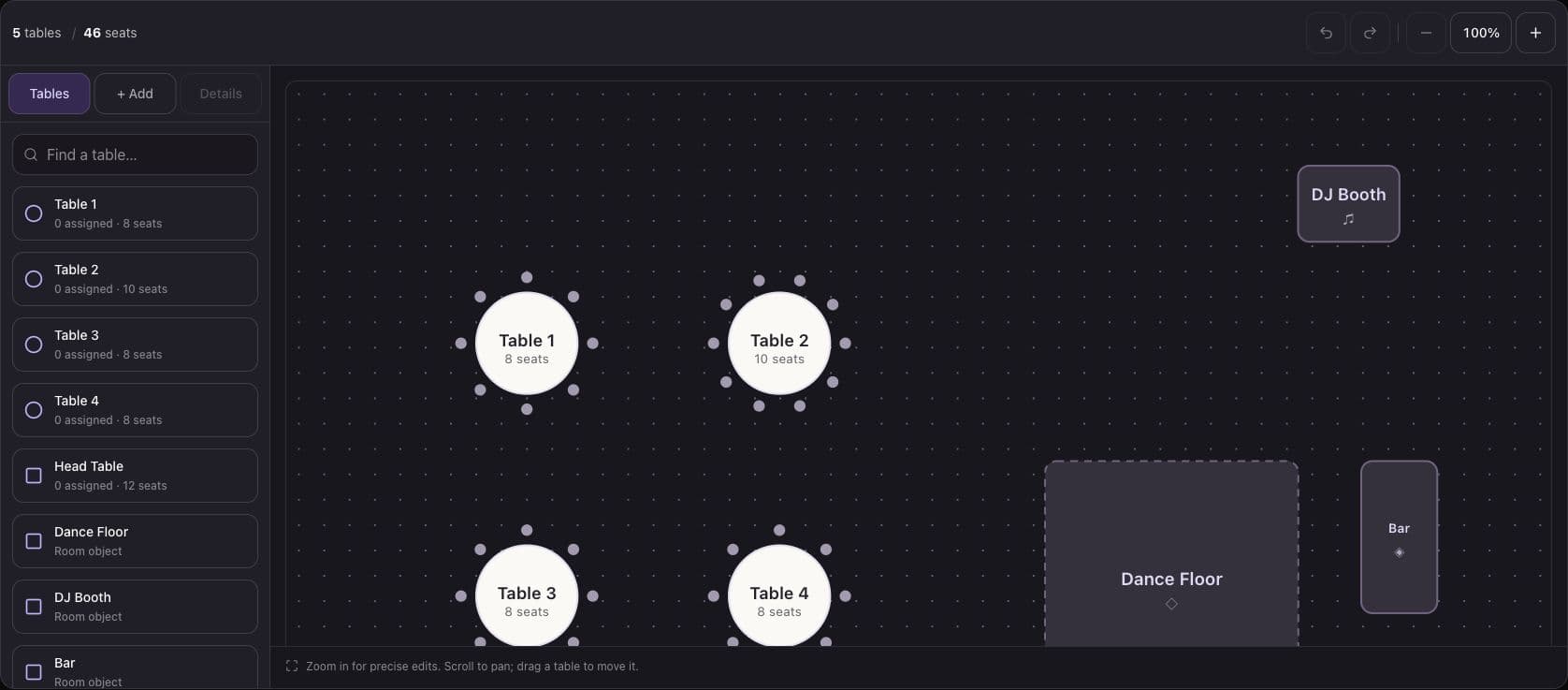
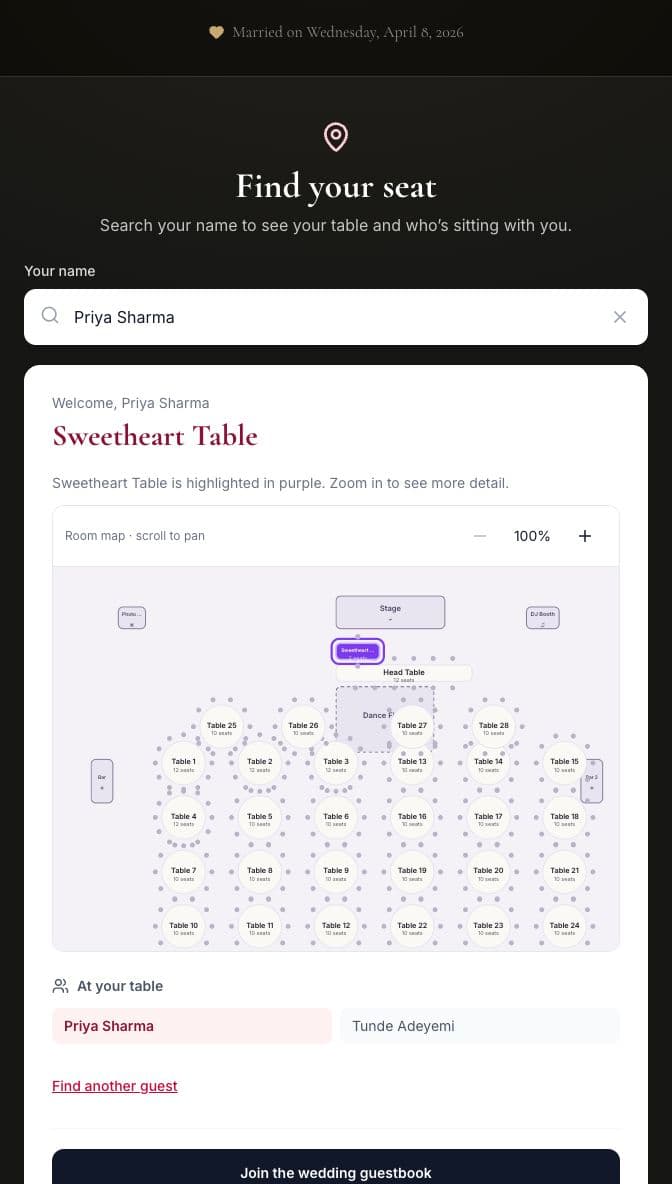
Amara is a wedding platform that combines live video streaming, digital guestbooks, and seating charts into a single guest experience. The seating chart is designed as the starting point — not the whole story. Guests scan a QR code, find their table, and are immediately connected to the live video stream and digital guestbook — no app download required.
- Drag-and-drop table editor with custom layouts (rounds, rectangles, head tables, U-shapes)
- QR code entry — guests scan once and access everything
- Live video streaming to projectors and big screens
- Video guestbook with social feed and likes
- Projector mode for real-time venue display
- CSV import for bulk guest list upload
- Collaborative editing — share access with your planner or mom (or both)
- Real-time sync — changes appear for all collaborators instantly, no version confusion
- Pricing: Included in wedding packages ($49–$149)
The key differentiator: Amara's seating chart isn't a standalone tool. It's the front door to your entire digital wedding experience. When you're evaluating a wedding seating chart app, ask yourself: does it stop working the moment guests sit down, or does it keep delivering value all night?
Zola
Zola is primarily a wedding registry and website platform with 148 website templates. Seating charts are available as a paid add-on. If you're already deep in the Zola ecosystem — registry, invites, website — the seating tool keeps everything under one roof.
- Basic drag-and-drop seating tool
- Guest list management (free)
- Seating chart: $14.99 one-time fee
- Guest messaging/texting: $79.99 premium add-on
- No live streaming, no video guestbook, no projector mode
- Strong registry integration (Zola's core product)
- Meal tracking by table assignment
- Wedding website themes that match invitations
Zola's seating chart is perfectly adequate for couples who need simple table assignments and are already managing their registry, website, and invitations through the platform. The limitation is that it's a planning tool only — it doesn't create any guest-facing experience on the wedding day itself.
Joy (WithJoy)
Joy offers free wedding websites with planning tools built in. Seating isn't its primary focus, but it's included. For couples who want a straightforward, no-cost option and don't need bells and whistles, Joy gets the basics done.
- Free wedding website and guest list
- Basic seating arrangement tools
- 601 website templates
- RSVP management included
- No live streaming or video guestbook features
- Best for couples who want a free, simple solution
- Limited table layout customization
- Mobile-friendly guest list editing
Joy's strength is accessibility. If you're planning a 60-person backyard wedding and your biggest tech concern is "does everyone know where to sit," Joy handles that without costing a cent. For larger or more complex events, the limitations show quickly.
AllSeated (now Prismm)
AllSeated specializes in 3D floor plans and seating — popular with wedding planners and venues for professional event design. If your wedding planner has mentioned "to-scale floor plans" or "realistic venue rendering," this is probably what they're using.
- 3D floor plan visualization with realistic venue rendering
- Detailed room layout tools with to-scale measurements
- Built for planners and venues, not just couples
- Steeper learning curve than other options
- No guest-facing features (no QR codes, no guestbook, no streaming)
- Professional pricing model (varies by planner/venue subscription)
- Virtual reality venue walkthroughs
- Social table feature for collaborative seating input
AllSeated is the Cadillac of floor plan design. The 3D walkthroughs are genuinely impressive — you can see exactly how your venue will look before the first centerpiece is placed. But it's fundamentally a planning tool for professionals. On the day of the wedding, it doesn't touch the guest experience.
TablePlanner
Worth a brief mention: TablePlanner is a lightweight, web-based tool focused exclusively on seating arrangement. It's popular with DIY couples who just want to drag names onto tables without any other features. Free for small guest lists, with paid tiers for larger events. It won't stream video or collect guestbook messages, but if all you need is a floor plan and a list of names, it does that one thing adequately.
Full Feature Comparison
| Feature | Amara | Zola | Joy | AllSeated |
|---|---|---|---|---|
| Drag-and-drop seating | Yes | Yes | Basic | Yes |
| QR code for guests | Yes | No | No | No |
| Live video streaming | Yes | No | No | No |
| Video guestbook | Yes | No | No | No |
| Projector mode | Yes | No | No | No |
| 3D floor plan | No | No | No | Yes |
| Guest list management | Yes | Yes | Yes | Yes |
| CSV guest import | Yes | Yes | Yes | Yes |
| No app download needed | Yes | N/A | N/A | N/A |
| Collaborative editing | Yes | Limited | Limited | Yes |
| Meal choice tracking | Coming soon | Yes | Yes | No |
| RSVP management | Coming soon | Yes | Yes | No |
| Website builder | No | Yes (148 templates) | Yes (601 templates) | No |
| Registry | No | Yes (core feature) | Yes | No |
| Custom table shapes | Yes (6+ shapes) | Basic (rounds, rectangles) | Basic | Yes (full CAD-level) |
| Mobile-optimized editing | Yes | Yes | Yes | Limited |
| Day-of guest engagement | Yes | No | No | No |
| Works without WiFi (offline cache) | Partial | N/A | N/A | N/A |
| Real-time collaborative sync | Yes | No | No | Yes |
| Guest-facing table finder | Yes (QR) | No | No | No |
Pricing Breakdown: What You're Actually Paying For
| App | Seating Chart Cost | What's Included | Best For | True Cost for Full Guest Experience |
|---|---|---|---|---|
| Amara | $49–$149 (full package) | Seating + live video + guestbook + projector | All-in-one guest experience | $49–$149 total |
| Zola | $14.99 (seating only) | Seating chart add-on; texting $79.99 extra | Already using Zola registry | $14.99–$94.98+ |
| Joy | Free | Basic seating with free website | Budget-friendly, basic needs | $0 |
| AllSeated | Varies (venue/planner pricing) | 3D floor plans + seating | Professional planners | $100–$500+ (planner subscription) |
If you're comparing Zola's $14.99 seating chart to Amara's $49 plan, remember what's included. Zola gives you table assignments. Amara gives you table assignments plus a live video wall, video guestbook, and projector mode — features that would cost $500–$1,500+ if you hired separate vendors for each.
Here's the math for a 200-guest wedding:
- Photo booth rental: $500–$1,500 (Brides.com, 2025 vendor pricing survey)
- Live streaming service: $300–$1,000 (WeddingWire vendor averages, 2025)
- Physical guestbook + display: $50–$150
- Printed seating chart poster: $30–$75
That's $880–$2,725 in separate vendor costs. Or $49–$149 with Amara — where it all connects through a single QR code scan.
The Hidden Cost of "Free"
Free tools like Joy and basic spreadsheet methods come with their own price tag — measured in time. If you're spending 10+ hours rearranging a Google Sheet, that's 10 hours you could have spent on literally anything else. (Cake tasting, for instance. Always choose cake tasting.) And free tools rarely offer guest-facing features, which means your guests still encounter a static poster board at the door. The tool saved you money but didn't save your guests any friction.
A 2026 WeddingWire survey found that couples who used dedicated wedding planning software saved an average of 40 hours over the course of their engagement compared to those who relied on spreadsheets and paper methods. For seating alone, that difference translates to roughly 6–10 hours reclaimed — hours that are especially precious in the final weeks before your wedding.
There's also the cost of errors. A misspelled name on a printed chart means reprinting — or hoping your guests are forgiving. A misassigned table on a spreadsheet that nobody caught until the rehearsal dinner means a last-minute scramble. Digital tools with drag-and-drop interfaces and visual floor plans make mistakes harder to make and faster to fix. That peace of mind has real value, even if it doesn't show up on a receipt.
The QR Code Gateway Effect: Why Your Seating Chart Should Do More
Here's what makes Amara different from every other wedding seating chart app: the seating chart isn't just a planning tool — it's the entry point to your entire wedding experience.
Think about the guest journey at most weddings. Guests arrive, find a poster board, squint at 200 names in 10-point font, locate their table, sit down, and… that's it. The seating chart did its job and immediately became irrelevant.
With Amara, the seating chart is the beginning of the experience, not the end. When guests scan the QR code on their table card, they find their seat. But they also land inside a browser-based app where they can:
- Watch the live video feed on their phone or see it on the big screen
- Record video guestbook messages for the couple — a more personal alternative to a photo booth
- See themselves on the big screen via projector mode
- React and engage with other guests' content in real time
One scan. No downloads. No sign-ups. That's the gateway effect — the seating chart becomes the reason every guest engages with your wedding tech. At a 500+ guest wedding, this single QR code replaces what used to require a photo booth ($500–$1,500), a streaming service ($300–$1,000), and a separate guestbook setup.
According to internal Amara data from 2025 weddings, couples using the seating chart as a QR entry point saw 73% guest engagement with the video guestbook — compared to 35–40% engagement when the guestbook was promoted separately. The seating chart isn't just organizational. It's your best marketing channel for getting guests to actually participate.
What Does That Look Like in Real Life?
Picture this: your 87-year-old abuela arrives, picks up her escort card, and scans the QR code because her granddaughter showed her how. She finds Table 6, sits down, and then — because the video guestbook is right there on her phone — she records a 30-second message in Spanish telling you how proud she is. That message shows up on the projector screen during dinner. Your partner cries. You cry. Everyone at Table 6 cries. That's the gateway effect in action — and it started with a seating chart.
Or consider a 350-guest Nigerian celebration where the Aso Ebi group — 40 people strong — arrives together and needs to find their tables fast. Instead of crowding around a poster, each person scans the QR code on their escort card while still in the greeting line. By the time they walk through the door, they already know their table. And by the time the owambe music hits, they're already recording video messages and appearing on the big screen. That's technology working the way your night should: effortlessly, joyfully, without anyone having to explain what to do.
Now imagine a South Asian baraat just finished — energy is through the roof, 400 guests are flooding into the reception hall. A poster board at that moment isn't a seating chart; it's a traffic accident waiting to happen. QR codes on escort cards mean guests find their seats while the energy stays high instead of grinding to a halt in a lobby.
How Digital Seating Charts Handle Large Weddings
For weddings with 200+ guests, a digital wedding seating chart app isn't just convenient — it's necessary. Here's why:
The Poster Board Bottleneck
At a 300-guest wedding, a printed seating chart at the entrance creates a 20–30 minute traffic jam as guests crowd around to find their name. With 25 tables and 300 names, the average guest spends 45–90 seconds scanning for their name (The Knot, 2025). Multiply that by 300 guests arriving in a 30-minute window, and you've got a cocktail hour that starts with a crowd clustered around a poster instead of at the bar. A QR code on each place card or table card eliminates this entirely — guests scan and know their seat before they walk through the door.
For context: a 2025 Brides.com survey found that 82% of wedding planners cited "guest flow at the reception entrance" as a top logistical concern at weddings over 200 guests. The poster board isn't just inconvenient — it's a genuine bottleneck that delays your entire evening timeline.
Last-Minute Changes (They Will Happen)
On average, 15–20% of RSVPs change in the final two weeks before a wedding (Brides.com, 2025). For a 250-guest wedding, that's 37–50 guests shifting. A digital chart updates in seconds. A printed poster means a trip to the copy shop — or a lot of creative Sharpie work that your calligrapher would weep over.
And it's not just RSVPs. Breakups happen. Family feuds erupt. Someone's plus-one becomes an ex between the RSVP deadline and the wedding day. (It happens more often than anyone admits.) A wedding seating chart app lets you move that person to a different table at 2 AM the night before without anyone ever knowing there was a crisis.
Complex Cultural and Family Dynamics
Some weddings require seating that accounts for deep cultural and family structure:
- South Asian weddings with 300–500+ guests often have specific seating for the bride's side, groom's side, family elders, and community VIPs — with hierarchies that shift based on who confirmed last. For more on planning technology for Indian weddings, see our Indian wedding planning technology guide.
- Nigerian owambe celebrations with Aso Ebi group seating need flexible table assignments that accommodate large family groups who arrive together. Our guide on Nigerian wedding planning with digital tools covers this in depth.
- Jewish weddings where the hora and other traditions mean guests move between tables and the dance floor — making clear initial assignments even more important
- Gulf and Arab weddings with VIP hierarchy and separate spaces for different guest groups need precise, updatable seating. See our Gulf Arab wedding technology guide for specific considerations.
- Mexican weddings with padrinos seating arrangements that honor the couple's sponsors at prominent tables
- Chinese banquet-style weddings where table count is culturally significant and guest lists often expand right up to the day of the event — a digital seating chart app that handles last-minute additions without stress is essential
A wedding seating chart app that handles constant rearrangement without breaking a sweat — that's what these celebrations need. And if you're streaming the ceremony to family abroad who couldn't make it, the seating chart QR code can also connect remote guests to the live feed — so your tía in Mexico City or your nana in Lagos feels like she's at Table 1.
The Numbers Don't Lie
| Wedding Size | Avg. Seating Changes (Final 2 Weeks) | Time to Update (Paper) | Time to Update (Digital App) |
|---|---|---|---|
| 100 guests | 10–15 changes | 2–3 hours | 10–15 minutes |
| 200 guests | 25–35 changes | 4–6 hours | 20–30 minutes |
| 300+ guests | 40–60 changes | 6–10 hours | 30–45 minutes |
| 500+ guests | 75–100 changes | "Just start over" | 45–60 minutes |
Source: Estimates based on The Knot 2025 Real Weddings Study and Brides.com 2025 planning survey data.
Good luck seating 400 people with a spreadsheet and a prayer. (Actually, we've talked to couples who tried. The spreadsheet always loses.)
What Wedding Planners Should Know About Seating Chart Apps
If you're a planner evaluating a wedding seating chart app for your clients, the calculus is different. You're not just looking for ease of use — you're looking for tools that make you look good and reduce day-of chaos.
A few things planners tell us matter most:
- Collaborative access: Can you and the couple edit simultaneously without version conflicts? Amara and AllSeated handle this well. Zola and Joy are more limited.
- Scalability: A tool that works for an 80-person dinner party might buckle at 400. Ask about performance at scale before committing.
- Day-of value: AllSeated's 3D floor plans are gorgeous for vendor coordination and client presentations, but they don't do anything for guests on the wedding day. Amara's QR gateway turns the seating chart into a guest engagement tool — which means fewer "what table am I at?" questions directed at your team.
- Client upsell potential: If you're offering live video as a premium service, a platform like Amara lets you bundle seating, streaming, and guestbook into one package rather than coordinating three separate vendors.
- Reporting and exports: After the event, can you export the final seating arrangement for your records? Useful for post-event recaps and future client references.
For planners working with videographers who want to incorporate live streaming, the seating chart QR code becomes the distribution method for the live feed — no separate link to share, no app for guests to download.
Planner Feature Comparison
| Planner Need | Amara | Zola | Joy | AllSeated |
|---|---|---|---|---|
| Multi-user editing | ✅ Real-time | ❌ Single user | ❌ Single user | ✅ Real-time |
| 200+ guest performance | ✅ Optimized | ✅ Functional | ⚠️ Basic | ✅ Optimized |
| Client presentation tools | ⚠️ Basic | ❌ None | ❌ None | ✅ 3D walkthrough |
| Day-of guest engagement | ✅ Full suite | ❌ None | ❌ None | ❌ None |
| Vendor coordination view | Coming soon | ❌ None | ❌ None | ✅ Full floor plan |
| Bundled upsell potential | ✅ High (video + guestbook) | ❌ Low | ❌ Low | ⚠️ Medium |
If you're a planner who wants to explore how wedding technology fits into your service offerings, our partners page has details on working with Amara as a preferred vendor.
How to Set Up Your Digital Seating Chart (Step by Step)
Getting started with a wedding seating chart app takes about 20 minutes. Here's the general process with Amara:
-
Import your guest list — Upload a CSV from your RSVP tracker, spreadsheet, or another platform. Amara maps names, party sizes, and meal preferences automatically.
-
Design your floor plan — Drag tables onto the canvas. Choose rounds, rectangles, head tables, or custom shapes. Match your venue layout so the digital version reflects reality. (Pro tip: ask your venue for a floor plan PDF — most have one ready to share.)
-
Assign guests to tables — Drag names onto tables individually or in groups. Amara shows table capacity so you don't accidentally seat 12 at a table for 10 (unless you really want to test that relationship).
-
Generate QR codes — Each table or place card gets a unique QR code. Guests scan it on arrival and instantly see their table number, plus access to the live stream and video guestbook.
-
Make last-minute changes — Swap guests between tables up to the moment they arrive. The QR code pulls live data, so changes reflect instantly. No reprinting required.
-
Share with collaborators — Give your planner, your mom, or your extremely opinionated aunt read-only or full editing access. Real-time sync means everyone sees the same version. (No more "I thought we moved Uncle Dave to Table 7.")
-
Test the QR experience — Before the big day, scan one of your generated QR codes yourself. Walk through the guest journey: see your table, open the live stream, record a test guestbook message. It takes 60 seconds and saves you from surprises.
For a deeper look at how digital tools handle every aspect of guest management, check out our complete digital wedding guestbook guide.
A Note on Venue WiFi
Your wedding seating chart app is only as reliable as your venue's internet connection. Before committing to any digital tool for day-of use, check with your venue about WiFi capacity. A 300-guest wedding where everyone is streaming video simultaneously needs more bandwidth than a typical guest network provides. We've written a full wedding venue WiFi and live streaming guide that covers what to ask your venue, minimum bandwidth requirements, and backup options.
Quick rule of thumb: you'll want at least 5 Mbps upload speed for live streaming and 1–2 Mbps download per concurrent viewer for smooth playback. Most venue guest networks aren't configured for this — but the fix is usually a conversation with the venue's AV team, not a full infrastructure overhaul.
Common Seating Chart Mistakes (and How a Good App Prevents Them)
Even with the best wedding seating chart app, the human decisions still matter. Here are the mistakes we see most often — and how digital tools help you catch them before they become dinner-table disasters:
Mistake 1: Seating exes at the same table. This sounds obvious, but when you're moving 200+ names around at midnight, it happens. A good digital tool lets you tag relationships and conflicts so the app flags potential issues before they become your maid of honor's problem.
Mistake 2: Ignoring table proximity. You separated those feuding cousins — great. But you put them at adjacent tables, so they're three feet apart. Digital floor plan views let you see physical proximity, not just table assignment.
Mistake 3: Forgetting accessibility needs. Guests with mobility needs should be near exits, restrooms, and accessible paths — not tucked in a corner because Table 22 was the last one filled. A visual floor plan makes this obvious in a way a spreadsheet never can.
Mistake 4: Not accounting for kids. A table of eight adults that's actually a table of eight adults and four toddlers is a different table entirely. Digital tools that track party size (including children) prevent overcrowding.
Mistake 5: Finalizing too early. The Knot's 2025 data shows that 23% of final RSVPs arrive in the last 72 hours before the wedding. Lock your seating chart too early and you're guaranteed to redo it. A digital app makes last-minute changes painless — which is the entire point.
Mistake 6: Forgetting the singles table dynamics. Grouping every unattached guest at one table might seem efficient, but it can feel like a setup — and not in a good way. A visual seating tool helps you distribute single guests among tables with friendly faces rather than creating an accidental speed-dating scenario. Mix in couples who are good conversationalists, coworkers who share interests, or friends-of-friends who might actually hit it off. The floor plan view makes these patterns visible in ways a spreadsheet column of "single" or "coupled" never will.
Mistake 7: Not considering sight lines and speaker proximity. Guests at tables near the DJ booth or live band won't be able to hold a conversation all night. Grandparents with hearing aids probably shouldn't be closest to the speakers. A digital floor plan that shows the full venue layout — including the entertainment setup, not just the tables — helps you catch these issues before anyone spends three hours shouting "WHAT?" at their neighbor.
Which Wedding Seating Chart App Should You Choose?
The best wedding seating chart app is the one that matches how you want your guests to experience your night — not just how you want to organize them beforehand.
Choose Amara if you want one platform that handles seating, live video, and guest engagement — especially for weddings with 100+ guests where you want an interactive experience. The seating chart doubles as the gateway to your entire digital wedding. Explore all seating chart features or compare Amara to other platforms.
Choose Zola if you're already using Zola for your registry and website and just need a basic seating add-on. The $14.99 price point is attractive if you don't need live video or guestbook features.
Choose Joy if budget is your top priority and you need a free solution with basic seating alongside a free wedding website.
Choose AllSeated if you're a wedding planner who needs professional 3D floor plans for venue coordination and client presentations.
For most couples planning a wedding with 150+ guests who want their technology to actually enhance the night — not just organize the logistics — Amara is the app that turns a seating chart into a memory-making machine. And if you're looking for more ways to make your reception unforgettable, our guides on unique wedding entertainment ideas for 2026 and interactive wedding reception ideas are worth a read.
Your seating chart is one of the last things you finalize and one of the first things your guests interact with on the big day. Make it count — not just as a logistics tool, but as the moment your guests step into the experience you've been building for months. One scan, one moment, and they're part of your night.
Frequently Asked Questions
Q: What is the best wedding seating chart app in 2026? A: The best wedding seating chart app depends on your priorities. Amara is the best all-in-one option because it combines drag-and-drop seating with live video streaming, a digital video guestbook, and projector mode — all accessible through a single QR code scan. Zola is best if you're already using its registry. Joy is best for couples on a tight budget. AllSeated is best for professional wedding planners who need 3D floor plans.
Q: Can I import my guest list into a seating chart app? A: Yes. Amara, Zola, and Joy all support guest list import via CSV or manual entry. Amara also lets you assign guests to tables with drag-and-drop after import, and bulk-assign groups to specific tables.
Q: Do guests need to download an app to use Amara's seating chart? A: No. Amara is entirely browser-based. Guests scan a QR code and access the seating chart, live video, and guestbook — all from their phone's browser. Nothing to install, no account to create. This is especially important for older guests or anyone who doesn't want another app on their phone.
Q: Is Zola's seating chart worth $14.99? A: Zola's seating chart is functional for basic table assignments and works well if you're already invested in the Zola ecosystem for your registry and website. However, it doesn't connect to any guest-facing experience on the day of the wedding. If you want seating to do more than just show table numbers — like connecting guests to live video and a video guestbook — a platform like Amara offers significantly more value per dollar.
**Q: Which wedding seating chart app is best for large weddings (