Back to blog
·26 min read·Amara Team

How to Live Stream Your Wedding to the Big Screen

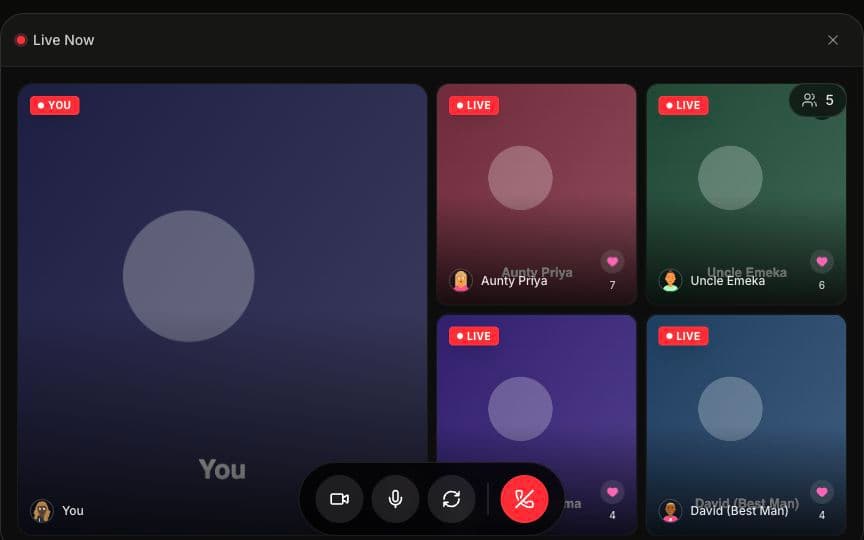
Imagine your reception with a live video wall showing guests waving, dancing, and sending messages in real time — right on the big screen. It's not a production crew setup. It's a laptop, a projector, and Wi-Fi.

Your cousin in Lagos doing a little dance on camera. Your college roommate holding up a toast from her living room in Seattle. Your abuela blowing kisses from Mexico City — all of it, live, on a screen the whole ballroom can see.

That's what a wedding live stream looks like when you flip the camera around and put your guests at the center.

Here's how to make it happen.

Key Takeaways

  • A live video wall requires just a laptop, a screen, an HDMI cable, and Wi-Fi — no cameras, no streaming software, no production team
  • Guests join via QR code on their phone and their video feed appears on the big screen in real time
  • Remote family can appear on the venue screen alongside in-person guests — turning passive viewing into real participation
  • Upload speed matters more than download — aim for at least 10 Mbps upload at your venue
  • Amara's projector mode is designed for big screens — high contrast, cinematic layout, readable from across a ballroom

What Is a Wedding Live Video Wall?

A wedding live video wall displays real-time video feeds from your guests on a projector, TV, or large screen at your venue. Unlike a pre-made slideshow or a montage you spent three weekends editing, it's happening live — guests see themselves and each other on screen as the reception unfolds.

This isn't one-way ceremony streaming (like Zoom or Facebook Live). It's an interactive experience where in-person guests and remote family are all on the same screen together.

With Amara, guests join through a QR code on their phones. Their video feeds appear on a browser-based projector display that you cast to any screen. According to Brides.com's 2025 trends report, live video displays have grown 34% year over year as couples look for ways to make receptions more interactive. And The Knot's 2026 Real Weddings Study found that 41% of couples now incorporate some form of live streaming or interactive video into their wedding day — up from just 12% in 2020.

The shift makes sense. Weddings are getting bigger again (the average U.S. wedding guest count hit 145 in 2025, per The Knot), while families are more geographically dispersed than ever. A live video wall bridges both realities — it makes a 200-person ballroom feel even more connected, and it brings the 30 people who couldn't travel into the room.

Amara is a wedding platform that combines live video streaming, digital guestbooks, and seating charts — meaning the video wall isn't a bolt-on. It's woven into the same experience your guests already use to find their seat and leave a message.

Why Couples Are Choosing to Live Stream Their Wedding on a Big Screen

The old version of a wedding live stream was a fixed camera pointed at the altar, broadcasting to a Zoom link your aunt couldn't figure out. It served a purpose — remote guests could watch — but it always felt a little flat. Like watching a concert through someone else's phone.

A live video wall flips that dynamic entirely. Instead of broadcasting to remote guests, it puts all your guests — in-person and remote — on the screen at the venue. The energy is different. It's participatory, communal, and honestly a little electric when the whole room realizes they're part of the display.

Here's why couples are gravitating toward this approach in 2026:

  • Multigenerational families are spread across countries. A 2025 Zola survey found that 72% of couples have at least one close family member living more than 500 miles away. For couples planning Indian weddings, Nigerian celebrations, or Gulf Arab weddings, this number is often even higher.
  • Guest expectations have evolved. After years of FaceTime calls, Instagram Lives, and TikTok duets, wedding guests — especially those under 40 — expect to be part of the content, not just consumers of it.
  • It doubles as entertainment. A live video wall is one of the most effective unique wedding entertainment ideas because it doesn't compete with your DJ or band — it amplifies the energy they're already creating.
  • It creates lasting content. The video guestbook messages recorded alongside the live stream become keepsakes you'll rewatch for years. (The live video is the moment; the guestbook is the memory.)
  • It's more inclusive than a traditional photo booth. There's no line, no props station, no awkward three-minute wait while the group ahead of you figures out the boomerang setting. Guests scan from their seat and they're live. That accessibility matters — especially for older guests, guests with mobility needs, and anyone who quietly skips the photo booth line every time.

One more thing worth noting: according to WeddingWire's 2026 couples survey, 58% of guests said they'd be more likely to engage with a live video wall than a traditional photo booth. The reason? No line, no props, no waiting — just scan and go.

What Equipment Do You Need to Live Stream a Wedding on a Big Screen?

Less than you think:

EquipmentPurposeCost
Laptop or tabletRuns the projector displayYou already have one
Projector, TV, or large monitorDisplays the live video wallVenue-provided or $50–$150 rental
HDMI cable (or wireless adapter)Connects laptop to screen$10–$20
Stable Wi-FiCarries the video streamsVenue-provided (test in advance)
QR codes on table cardsGets guests into the experienceIncluded in your Amara plan

That's it. No cameras, no streaming software, no production team. The total setup cost beyond your Amara plan ($49–$149) is essentially $0 if your venue has a projector and Wi-Fi.

Compare that to hiring a live stream production crew — which runs $800–$2,500 on average, according to Thumbtack's 2025 pricing data — and the savings are significant. You're not replacing professional videography (your videographer captures the cinematic highlight reel). You're adding something entirely different: a live, participatory moment that no production crew can create.

Cost Comparison: Wedding Live Stream Approaches

ApproachEquipment CostOngoing CostWhat You Get
Amara + venue screen$0–$150 (HDMI + rental if needed)$49–$149 (Amara plan)Interactive video wall, video guestbook, seating chart, remote guest participation
Professional live stream crew$0 (they bring gear)$800–$2,500 per eventOne-way broadcast, professional camera angles, ceremony coverage
DIY Zoom/Meet setup$10–$20 (HDMI cable)Free–$13/monthTwo-way video, corporate feel, 40-min limit on free tier
Photo booth rental$0 (included in rental)$400–$1,200 per eventPrinted strips, props, one-at-a-time usage, long lines

The math is pretty clear. Amara gives you the most interactive experience at a fraction of what a production crew or photo booth rental costs — and you keep the video guestbook content forever.

If you're a wedding planner considering live video as a premium offering, the minimal equipment list makes it easy to add to any package. And for videographers, the video wall complements — rather than competes with — your work.

A Note on Screen Size

Bigger is better here, but not mandatory. Here's a quick reference:

Screen SizeBest ForVisibility Range
50–65" TVIntimate weddings (50–100 guests), cocktail lounges~20 feet
80–100" projector screenMid-size receptions (100–250 guests)~40 feet
120"+ projector screen or LED wallLarge ballrooms (250–500+ guests)50+ feet
Multiple screensVenues with columns, multiple rooms, or outdoor spacesFull coverage

If your venue has multiple rooms — like a cocktail hour lounge and a main ballroom — consider running the projector display on screens in both spaces. Same browser link, different devices.

A practical note on projectors vs. TVs: In well-lit venues — outdoor tents, ballrooms with chandeliers, spaces with lots of natural light — a bright TV or monitor often outperforms a projector. Projectors need dim environments to look crisp. If your venue is well-lit, a 65–85" TV on a stand might be the better call. LED walls are the gold standard for brightness and visibility, but they typically come with a higher rental cost ($500–$2,000+ depending on size and vendor).

Step-by-Step Setup with Amara

1. Create your wedding on Amara

Set up your event, upload your guest list, and configure your seating chart. This takes about 5 minutes. You'll choose your display theme, upload a photo or two, and set your wedding date. Amara is a wedding platform that combines live video streaming, digital guestbooks, and seating charts — so everything lives in one place.

2. Set up your QR codes

Amara generates a unique QR code for your wedding. Print it on table cards, place it on welcome signage, or include it in your program. Pro tip: put them on every table — not just one poster. Table-level placement drives 60–80% participation rates.

We've seen the difference firsthand. Couples who place a single QR code poster at the entrance get around 20–30% participation. Couples who put codes on every table? They consistently hit 60–80%. It's the difference between a half-empty video wall and one that's buzzing with energy all night.

3. Do a venue tech check (1–2 weeks before)

This step is optional but worth it — especially for larger weddings. Visit your venue, connect to the Wi-Fi, and run a speed test. Confirm where the screen will go, where you'll place the laptop, and how long an HDMI cable you need. For a full checklist of what to ask and test, see our wedding venue Wi-Fi guide.

4. Connect to your venue's screen

On the day of, open Amara's projector mode on a laptop. Connect the laptop to your projector or TV via HDMI. The projector display runs entirely in the browser — no software to install. The whole setup takes under 5 minutes (less time than it takes to bustle a wedding dress).

5. Guests scan and join

When guests scan the QR code, they find their seat and can immediately turn on their camera. Their video feed appears on the big screen in real time. No app download, no account creation — just scan and go.

6. Enjoy the show

The live video wall updates automatically. Guests appear on screen, video guestbook messages roll in, and the energy builds throughout the night.

Getting Guests on Screen: Maximizing Participation

The key to a great live video wall is participation. A video wall with three people on it feels awkward. A video wall with 40 people on it feels electric. Here's how to maximize it:

  • Place QR codes on every table — not just at a single station. Table-level placement is the #1 driver of engagement
  • Announce it — have your MC or DJ let guests know they can appear on the big screen. A simple "Scan the QR code on your table to join the live video wall!" works perfectly
  • Make it fun — the first time someone sees themselves on screen, reactions spread fast. Their table starts waving. The next table notices. Within 20 minutes, the whole room is engaged
  • Use the seating chart as the hook — when guests scan to find their table, they're already in the app and one tap away from going live
  • Time it right — start the video wall during cocktail hour or early dinner. By the time speeches begin, guests are already familiar with it
  • Assign a "hype person" — this could be a bridesmaid, a groomsman, or your most extroverted friend. Ask them to be the first person on camera and to encourage their table. Social proof is powerful — once a few people are on screen, others follow
  • Prime remote guests in advance — send remote family a quick text the morning of: "Here's your link — go live tonight and you'll be on the big screen at the venue!" Giving them a heads-up means they'll be ready, dressed, and emotionally prepared (tissues optional)
  • Lean into cultural moments — announce the video wall right before the hora, the baraat, or the money spraying at a Nigerian reception. These are the moments when energy is highest and guests naturally want to be seen

For weddings with 500+ guests, the effect compounds. The bigger the crowd, the more dynamic the video wall becomes, and the more people want to join. At large Nigerian owambe celebrations or Indian receptions, the video wall becomes its own attraction — guests treating it like a live photo booth, but better. At interactive wedding receptions, the video wall becomes the centerpiece that ties everything together.

How Amara Compares to Other Wedding Live Stream Options

FeatureAmaraEventLiveLovecastZoom/Google Meet
Live guest video on big screen✅ Yes❌ No (stream-only)⚠️ Limited✅ Yes (but corporate feel)
QR code entry✅ Yes❌ No❌ No❌ No
Projector mode✅ Yes (cinematic)❌ No❌ No⚠️ Gallery view only
Video guestbook✅ Yes❌ No⚠️ Interactive chat❌ No
Seating chart✅ Yes❌ No❌ No❌ No
No app download✅ Yes✅ Yes✅ Yes❌ Requires app
Remote guest participation✅ On-screen⚠️ One-way only⚠️ One-way only✅ Two-way
Designed for weddings✅ Yes✅ Yes✅ Yes❌ No
Starting price$49$50/eventFree tierFree (40-min limit)

EventLive and Lovecast focus on one-way streaming — broadcasting your ceremony to remote viewers. They're good for livestreaming the ceremony, but they don't put your guests' video on the big screen at the venue. Think of them as "wedding TV" — remote viewers watch, but can't participate.

Zoom and Google Meet offer two-way video, but the experience feels corporate. Meeting links, gallery grids, and "you're on mute" notifications don't match the vibe of a wedding reception. (Nothing kills wedding magic quite like someone accidentally sharing their screen.)

Amara flips the model — it puts your guests' live video on the big screen at the venue, while also letting remote family join and appear alongside in-person guests. It's the difference between watching a wedding and being in the wedding. For a full platform comparison, check out our comparison page.

Wi-Fi and Bandwidth Tips for Wedding Live Streaming

Your venue's Wi-Fi is the foundation. Here's what to check:

  • Upload speed: Aim for at least 10 Mbps. Test with a speed test at the venue during a busy time. Upload matters more than download because guests are sending video, not just watching
  • Guest capacity: Make sure the Wi-Fi network can handle your guest count. Many venue networks are designed for staff, not 200 simultaneous devices
  • Backup plan: Bring a mobile hotspot as a fallback. A 5G hotspot can handle 20–30 simultaneous video streams comfortably
  • Dedicated network: Ask your venue if they can set up a separate SSID for your event to avoid bandwidth competition with other users

Bandwidth by Guest Count

Guest CountRecommended Upload SpeedTypical Active StreamersBandwidth Needed
50–10010 Mbps5–15 at a time5–15 Mbps
100–20020 Mbps10–30 at a time10–30 Mbps
200–40050 Mbps20–60 at a time20–60 Mbps
400+100 Mbps+40–100+ at a time40–100+ Mbps

A key insight: not all guests stream at once. At any given moment, typically 10–30% of guests have their camera active. Amara optimizes each stream to roughly 500 Kbps–1 Mbps, so even moderate venue Wi-Fi handles it well.

What to ask your venue coordinator:

  1. What's the upload speed? (Not download — upload.)
  2. How many devices can the network support simultaneously?
  3. Can we get a dedicated network or SSID for our event?
  4. Has the venue hosted events with live streaming before?

For a complete breakdown of bandwidth needs and what to ask your venue, see our wedding venue Wi-Fi guide.

What Guests See vs. What's on the Big Screen

On their phone, guests see:

  • Their seating assignment
  • The live video feed (their own camera + others)
  • The video guestbook where they can record messages
  • A social feed with reactions and likes

On the big screen, the projector mode shows:

  • A grid of live guest video feeds that rotates through active participants
  • New guestbook messages as they come in
  • A clean, cinematic layout designed for large displays
  • High contrast and large text for visibility from across the room

The projector mode is designed to look great from across a ballroom — no phone UI, no clutter, just a polished display that complements your venue decor. This distinction matters. What works on a 6-inch phone screen doesn't work on a 100-inch projector. Amara's projector mode uses larger text, higher contrast ratios, and a layout that's readable from 50+ feet away.

For more creative setup ideas — including using multiple screens, placing displays near the dance floor, and creating "video tunnels" at the entrance — see our wedding projector ideas guide.

Structuring Your Timeline Around Big Screen Moments

Not every moment needs the live video wall. Knowing when to turn it up (and when to let the moment breathe) is what separates a great experience from a distracting one.

TimeProjector ContentWhy
Cocktail hourWelcome display + early guestbook messagesSets the tone, gets early adopters scanning
Dinner (first course)Live video grid (guests at tables, toasting)Keeps energy up between courses
SpeechesPause live feed or show subtle displayLet the moment belong to the speakers
First danceResume live video — capture crowd reactionsThe couple's dance surrounded by smiling guests on screen
Hora / baraat / special dancesFull live video wallThese are peak communal energy moments — the wall amplifies the joy
Open dancingFull live video wall + guestbook messagesPeak energy, maximum participation
Last 30 minutesBest guestbook messages from the nightNatural wind-down, celebrates what everyone shared

Pro tip for speeches: Rather than turning the video wall off entirely, switch to a subtle mode that shows the speaker's table or a single "now playing" card. It keeps the screen active without competing with the moment.

Cultural moments that shine on the big screen: The hora — when you're lifted on chairs and half the room is singing — is pure magic on a video wall. Same with the baraat procession, where remote family can see the groom's entrance from every angle. At Nigerian owambe receptions, the aso oke reveal and the spraying moments become even more joyful when guests can see themselves on screen. These are communal, high-energy traditions, and the video wall matches their energy.

For Remote Family: More Than Just Watching

The streaming features aren't just for the venue. Remote family members can:

  1. Open the wedding link in their browser (no app needed)
  2. Turn on their camera and appear on the big screen at the venue
  3. Leave video guestbook messages for the couple
  4. Watch the live feed from wherever they are in the world

The moment when the room sees Grandma waving from her living room in India, or cousins cheering from a watch party in London — that's what turns a livestream from a nice-to-have into an unforgettable part of the night.

According to The Knot's 2026 Real Weddings Study, 67% of couples have immediate family members who can't attend in person — whether due to travel costs, health limitations, or visa complications. A wedding live stream that lets remote guests actually appear on the big screen gives them a role in the celebration, not just a window into it.

One couple told us their favorite moment was when their grandmother in Guadalajara appeared on screen during the hora loca and the entire dance floor erupted. She wasn't just watching. She was there.

For a deeper look at how to plan live streaming for family abroad — including time zone tips, watch party ideas, and how to coordinate group appearances — check out our guide on streaming your wedding to family abroad.

How Remote Guest Participation Differs by Platform

FeatureAmaraTraditional Livestream (Zoom/YouTube)
Remote guest appears on venue screen✅ Yes❌ Not designed for this
Two-way interaction✅ Yes⚠️ Limited (chat only on YouTube)
No app required✅ Yes❌ Zoom requires download
Video guestbook messages saved✅ Yes❌ No
Feels like a wedding✅ Yes❌ Feels like a meeting or broadcast

Video Guestbook Meets Live Video Wall

One of the things that makes this setup special is how the video guestbook and the live video wall work together. During the reception, guests can:

  • Go live on camera and appear on the big screen in real time
  • Record a guestbook message that's saved permanently and also displayed on the projector when it comes in

The live video is ephemeral — it's the energy of the moment. The guestbook messages are permanent — they're what you'll watch on your first anniversary. Together, they create an experience that's both immediate and lasting.

This dual approach addresses a real concern couples have: "Will there be anything to keep after the night is over?" The answer is yes — every video guestbook message is saved, downloadable, and rewatchable. The live video wall creates the energy; the guestbook captures it.

According to a 2025 WeddingWire survey, 63% of couples said they wished they had more personal, candid content from their wedding day — not just professionally shot footage, but the unscripted moments. A video guestbook running alongside a live video wall captures exactly that: your college friends belting your song, your dad trying not to cry (and failing), your niece doing her best dance moves at the dessert table.

Curious how video guestbooks compare to traditional photo booths? We broke it down in our video guestbook vs. photo booth comparison. And if you're weighing digital guestbooks against the classic pen-and-paper version, our digital vs. traditional wedding guestbook guide covers everything. For the full rundown on setting up and getting the most out of your digital guestbook, see our digital wedding guestbook guide.

Real-World Setup Scenarios

Scenario 1: Intimate backyard wedding (80 guests)

  • Screen: 55" TV on a stand near the dance area
  • Connection: Home Wi-Fi (confirmed 25 Mbps upload)
  • QR codes: Printed on escort cards
  • Remote guests: 8 family members joining from overseas
  • Result: 50+ guests joined the video wall, 35 left guestbook messages. The couple's aunt in Manila appeared on screen during the first dance, and the whole backyard cheered.

Scenario 2: Ballroom reception (250 guests)

  • Screen: Venue's built-in 120" projector screen
  • Connection: Venue's dedicated event Wi-Fi (100 Mbps upload)
  • QR codes: Table tent cards at every table + poster at entrance
  • Remote guests: 25 family members across three time zones
  • Result: 180+ guests joined, video wall rotated through active feeds all night. The DJ referenced the video wall during announcements, which drove a second wave of participation after dinner.

Scenario 3: Multi-city celebration (400 guests, 60 remote)

  • Screen: Two 85" TVs flanking the dance floor + one in cocktail lounge
  • Connection: Venue Wi-Fi + 5G hotspot backup
  • QR codes: Table cards, program inserts, and a link texted to remote guests
  • Remote guests: Watch parties in three countries
  • Result: Remote family from three countries appeared on the venue screens, including a coordinated toast from a watch party in Mumbai. The couple later said the remote toast was their favorite moment of the night.

Scenario 4: Destination wedding (120 guests, 150 remote)

  • Screen: 75" TV rented from a local AV vendor
  • Connection: Resort Wi-Fi (tested at 35 Mbps upload) + portable hotspot
  • QR codes: Welcome bag inserts + table cards
  • Remote guests: 150 family and friends who couldn't make the trip
  • Result: More remote guests than in-person guests — and the video wall made both groups feel like one celebration. Guestbook messages poured in from midnight watch parties, morning coffee toasts, and everything in between.

Scenario 5: Large Nigerian owambe reception (500+ guests)

  • Screen: LED wall behind the stage + two 85" TVs near the entrance and the dance floor
  • Connection: Venue's fiber internet (150 Mbps upload) + dedicated SSID for the event
  • QR codes: Printed on aso oke-themed table cards at all 50+ tables, plus signage near the photo area
  • Remote guests: 80+ family members across London, Houston, and Abuja
  • Result: The video wall became its own event-within-the-event. During the spraying, guests crowded around the screen to see themselves alongside remote family. Over 300 guests joined the wall, and 120+ guestbook messages were recorded — including a group toast from the London watch party that brought the entire hall to its feet. For more on managing 500+ guest weddings with technology, we've got a full guide.

Troubleshooting Common Issues

Even the smoothest setup benefits from a quick troubleshooting plan. Here's what to do if something doesn't go perfectly (because weddings are live events, and live events are wonderfully unpredictable):

IssueQuick Fix
Screen shows "no signal"Check HDMI connection. Try a different HDMI port. Make sure laptop display is set to "mirror" or "extend."
Video wall is laggySwitch to your backup hotspot. Ask the venue to restart the router. Reduce the number of active streams by adjusting display settings.
Guests can't scan QR codeEnsure QR codes are printed at a readable size (at least 2" x 2"). Check that the venue URL isn't blocked by the Wi-Fi network.
Projector image is washed outDim nearby lights, close curtains, or switch to a TV/monitor which handles ambient light better.
Remote guests can't connectConfirm they're using a modern browser (Chrome, Safari, Firefox). Have them try a different network or restart their browser.
Low participationHave your MC make an announcement. Ask your hype person to get their table on camera first. The social proof effect usually kicks in within minutes.
Laptop goes to sleepAdjust power settings to "never sleep" when plugged in. Keep the charger connected — projector mode uses more battery than you'd expect.
Audio feedback from speakersMute the laptop's audio output if the venue's speaker system is nearby. The video wall is visual — audio comes from the room itself.

Most of these issues resolve in under two minutes. The key is having one designated person — a tech-savvy groomsman, your day-of coordinator, or your wedding planner — who knows the setup and can troubleshoot if needed.

Accessibility and Guest Experience Considerations

A wedding live stream on the big screen should feel welcoming for every guest — not just the ones who grew up with smartphones glued to their hands. A few things worth thinking about:

For older guests and those less comfortable with technology: The QR code scan opens a simple browser page — no app to download, no account to create. We've seen 80-year-old grandparents go live on their first try because a grandchild helped them scan once and said "just wave." That's it. The barrier to entry is about as low as it gets.

For guests with mobility needs: Because the video wall is scan-from-your-seat, there's no need to get up, walk to a photo booth, or wait in line. A guest in a wheelchair, a guest recovering from surgery, a guest holding a sleeping baby — they're all included from exactly where they are.

For guests who'd rather not be on camera: Participation is always optional. Guests can use the app to find their seat and leave a written message without ever turning on their camera. The video wall celebrates the people who want to be seen without pressuring those who don't. (Not everyone is a "wave at the camera" person, and that's completely fine.)

For multilingual families: The QR code and browser experience are visual and intuitive enough that language barriers rarely become an issue. We've seen it work at weddings where guests spoke four or five different languages — the interface is simple enough that a smile translates in every one of them.

According to a 2026 Brides.com accessibility report, 78% of couples said inclusive guest experiences were a priority in their planning. A live video wall that works from any seat, requires no app, and lets guests choose their level of participation checks that box in a way that traditional entertainment options often don't.

Frequently Asked Questions

Q: How many guests can be on the live video wall at once? A: Amara's projector mode displays multiple guest video

live streamingprojector modewedding techsetup guide

Ready to try Amara?

Set up your wedding in 5 minutes. No credit card required.

Get Started Free