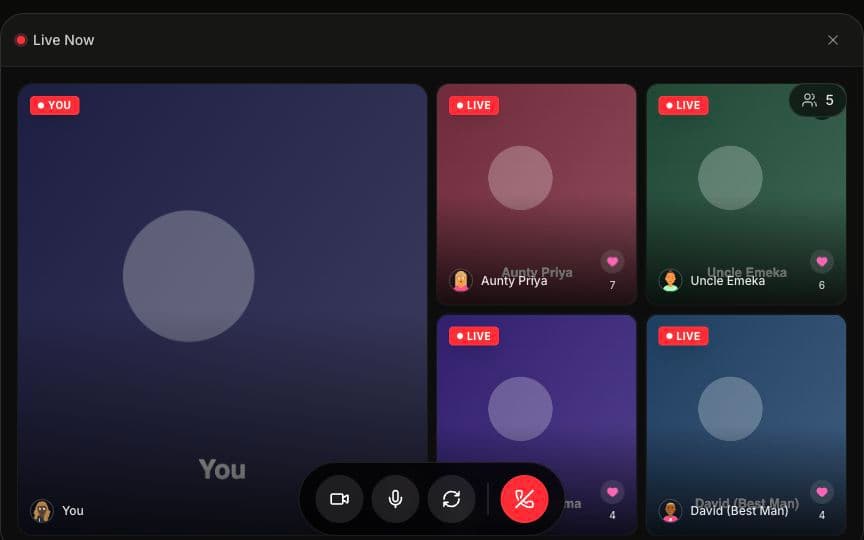
Wedding Projector Ideas: Display Live Guest Videos at Your Reception
A projector at your wedding doesn't have to mean a photo slideshow set to an Ed Sheeran song. In 2026, couples are using screens to display live guest video, real-time guestbook messages, and interactive feeds that make the reception feel like a shared experience — not a passive viewing party.
According to The Knot's 2026 Real Weddings Study, 41% of couples now incorporate some form of digital display into their reception, up from just 18% in 2022. The shift is clear: the big screen has gone from "nice backdrop" to "the thing everyone talks about on the drive home."
Here are the best ways to use a wedding projector display — plus the equipment specs, cost breakdowns, and timeline strategy to make it actually work on your night.
Key Takeaways
- Live video walls create a feedback loop — guests see themselves on screen, react, and participation snowballs across the room
- The projector replaces 3 separate expenses: photo slideshow ($100–$300 setup), guestbook display, and live stream display
- Any screen works — projectors, TVs, LED walls, or monitors. TVs are actually better in well-lit venues
- Time your content — pause during speeches, go full energy during dancing
- Two screens > one for venues with 200+ guests to keep everyone connected
Beyond Slideshows: Why a Live Video Wall Changes the Room
The classic photo montage has its place — but it's passive. Guests glance at it and move on because they've seen it all before (or they haven't, and they'll watch it on the phone later).
A live video wall is different because it's happening now. Guests see themselves, their friends, and family members appearing on screen in real time. According to WeddingWire's 2025 trends report, live video displays have grown 34% year over year as couples move away from pre-recorded content. A separate Brides.com survey found that 78% of guests said interactive reception elements made them feel "more connected to the couple and other guests" compared to traditional reception formats.
It creates a feedback loop: someone notices they're on the big screen, they wave or dance, their table starts laughing, and suddenly everyone wants to get on camera. That energy builds throughout the night and becomes one of the most talked-about elements of the reception.
Think about it this way — at a 250-person wedding, there are guests who have never met each other. The groom's college friends, the bride's extended family, the parents' work colleagues. A live video wall gives everyone a shared focal point. It's the digital equivalent of a dance floor: a space where strangers become part of the same moment.
Amara is a wedding platform that combines live video streaming, digital guestbooks, and seating charts — and its projector mode is purpose-built to display all three on a big screen at your reception.
The Psychology Behind the Big Screen Effect
There's a reason arena concerts use jumbotrons and sports bars line their walls with TVs. Shared screens create collective attention — a concept behavioral psychologists call "joint visual engagement." When a room of 200 people all look at the same thing at the same time, it triggers a sense of belonging that's almost primal (it's the campfire, just with better resolution).
At weddings specifically, this matters because the average reception lasts four to five hours (The Knot 2026 Real Weddings Study), and maintaining energy across that window is a genuine challenge. A Zola 2025 post-wedding survey found that couples who used interactive digital displays reported 27% higher guest satisfaction scores compared to those with no screen or a static slideshow. The screens don't just entertain — they give guests a reason to stay engaged past the third hour, when energy traditionally dips between dinner and the last dance.
5 Wedding Projector Display Ideas for Your Reception
1. The Live Video Grid
Display a grid of live guest video feeds on the big screen. As guests join through the QR code, their camera feed appears alongside others. It's dynamic, social, and visually impressive in a large venue.
Picture this: your 350-guest reception in a hotel ballroom. The projector shows a grid of twelve live feeds — Table 4 raising champagne glasses, your college roommate dancing with her toddler, your grandmother waving from the corner booth. The grid shifts as new people join, keeping the display fresh all night.
Best for: Ballrooms, large reception halls, outdoor tented receptions Pair with: The seating chart QR code — guests scan to find their table and are immediately one tap from the video wall
2. The Real-Time Guestbook Wall
Show video guestbook messages as they come in. Guests record a 30-second message from their phone, and it appears on the projector for the whole room to see. Laughter, tears, and inside jokes — shared live with the entire reception.
This setup is particularly powerful during Indian wedding receptions where you might have 400+ guests and the couple physically can't visit every table. The guestbook wall brings every table's love to the couple — and to each other. The same goes for Nigerian Owambe celebrations and Gulf Arab weddings, where guest counts regularly reach into the hundreds and the reception energy is everything.
Best for: Cocktail hour, quieter moments during dinner, a dedicated "guestbook station" area Pair with: Dinner courses — play messages between courses to keep energy up during transitions
3. The Dual-Screen Setup
Use two screens — one for live video feeds and one for guestbook messages. This works well in larger venues where you want continuous engagement without content competing for space on a single display.
For context: at a 500+ guest wedding, a single screen only reaches about 40–50% of the room depending on sight lines. Two screens positioned on opposite sides of the venue bump that to 80–90% visibility. That's the difference between "oh, I didn't even notice the screen" and "did you see what Uncle Raj said on the video wall?"
Best for: Venues with multiple areas, large guest counts (200+) Cost: Add one projector rental ($50–$150) or use venue's existing multi-screen setup
4. The Welcome Display
Run the projector during cocktail hour as guests arrive. Show a welcome message, seating chart info, and early guestbook messages. As the night progresses, transition to live video. This eases guests into the technology before the reception kicks into full gear.
Here's why the timing matters: Zola's 2025 reception data shows that guest engagement with digital elements peaks when introduced during cocktail hour rather than mid-reception. Early exposure gives guests time to scan, explore, and figure out the QR code while they're standing around with a drink in hand — not once they're mid-conversation at their dinner table.
Best for: Cocktail hour, transitional moments between ceremony and reception Pair with: QR code signage — cocktail hour is when early adopters set the scanning tone for everyone else
5. The Dance Floor Backdrop
Position a screen behind or beside the dance floor. During open dancing, show live guest video feeds alongside the action. It amplifies the party atmosphere and gives everyone a reason to get on camera.
This is where your wedding projector display goes from "cool feature" to "the thing that made the party." There's something about seeing yourself dancing on a big screen that turns even the most reluctant uncle into a performer. It's the hora on the big screen. It's the baraat procession captured live from six different angles — all from guests' phones.
Best for: Dance-focused receptions, younger crowds, high-energy celebrations like Nigerian Owambe and Indian sangeet nights Pair with: Your DJ or MC announcing "You're on the big screen!" to get the first wave of participants
For more creative reception ideas beyond the projector, check out our guide to unique wedding entertainment ideas for 2026 and interactive wedding reception ideas.
What Guests See on Their Phones vs the Screen
This is a common question — and the answer matters for the experience.
On the phone, each guest sees:
- Their own camera preview
- A feed of other guests' video streams
- The guestbook where they can record or browse messages
- Their seating assignment
On the projector, the display shows:
- A curated grid of live video feeds
- New guestbook messages as they arrive
- High-contrast, large-format layout designed for visibility across the room
- Clean cinematic styling — no phone UI, no clutter, no platform branding
The projector mode is purpose-built for big screens. It looks great from 50 feet away in a dim ballroom or a brightly lit tent. The design is intentionally minimal so it complements your venue decor rather than competing with it.
The distinction matters because guests aren't watching the same thing twice. Their phone is personal — their camera, their messages, their view. The projector is communal — the room's shared experience. It's the difference between watching a concert on your phone screen versus looking up at the stage.
For a deeper walkthrough of how the big screen setup works with Amara's live streaming, see our guide on how to live stream your wedding to a big screen.
Structuring Your Timeline Around Big Screen Moments
Not every moment needs the projector active. Here's a suggested timeline:
| Time | Projector Content | Notes |
|---|---|---|
| Cocktail hour | Welcome message + seating chart + early guestbook messages | Gets early adopters engaged |
| Dinner | Live video grid (guests at their tables, waving, toasting) | Keeps energy between courses |
| Speeches | Pause projector or show subtle branded display | Let speakers have the full room's attention |
| First dance | Resume live video — capture crowd reactions | The couple's dance surrounded by smiling guests on screen |
| Open dancing | Full live video wall + guestbook messages | Peak energy, maximum participation |
| Last hour | Highlight reel of best guestbook messages from the night | Natural wind-down, celebrates what everyone shared |
Work with your DJ or MC to call attention to the big screen at key moments — "Look up! You might be on camera!" This single announcement typically triggers the participation snowball.
A Note on the Speech Pause
This one trips people up. During toasts and speeches, you want every eye on the speaker — not on a screen showing Cousin Marco making funny faces from Table 12. Pause the live video wall or switch to a simple display (the couple's names, a monogram, or nothing at all). Resume immediately after the last speech, when energy needs a boost anyway.
Wedding planners who've managed projector displays consistently flag the speech moment as the one thing to coordinate in advance with your AV operator or MC.
How Long Should Each Phase Run?
Couples often ask for more specific timing, so here's a breakdown based on a typical four-and-a-half-hour reception (Brides.com 2025 reception planning data):
| Reception Phase | Approximate Duration | Screen Mode |
|---|---|---|
| Cocktail hour | 45–60 minutes | Welcome display + seating chart |
| Dinner seating + first course | 15–20 minutes | Transition to live video grid |
| Dinner courses + table mingling | 40–60 minutes | Live video grid, guestbook messages between courses |
| Speeches and toasts | 15–30 minutes | Paused or monogram display |
| First dance + parent dances | 10–15 minutes | Resume live video — crowd reactions on screen |
| Open dancing | 60–90 minutes | Full live video wall + guestbook messages |
| Last dance + wind-down | 15–20 minutes | Highlight reel of best guestbook messages |
The key insight: the screen should feel like it breathes with the night. Active during high-energy moments, quiet during intimate ones. That rhythm is what separates a wedding projector display that feels intentional from one that feels like a TV someone left on in the background.
Equipment and Venue Coordination
Here's what to discuss with your venue:
- Screen or projector availability — many venues have built-in AV equipment you can use at no extra cost
- HDMI access — you'll need to connect a laptop to the screen (bring your own HDMI cable as backup)
- Wi-Fi strength — ask for a dedicated network or the bandwidth specs. The projector laptop needs the most reliable connection
- Power outlets — near the screen for your laptop
- Screen placement — visible from most seats, but not blocking the dance floor or head table
- Ambient lighting — projectors look best in dimmer environments; TVs and LED walls work in any lighting
If your venue doesn't have a projector, you can rent one for $50–$150 from local AV rental companies. A 65" TV on a stand also works well — and actually looks better than a projector in well-lit venues because it's not affected by ambient light.
Wedding Projector Display: Screen Type Comparison
| Screen Type | Best For | Typical Cost | Ambient Light Tolerance | Min. Recommended Size | Setup Complexity |
|---|---|---|---|---|---|
| Projector + screen | Large walls, dim venues | $50–$150 rental | Needs low light | 100" diagonal | Medium — needs positioning and focus |
| 65" TV on stand | Any lighting, smaller venues | $100–$200 rental | Works in any light | 65" (for up to 150 guests) | Low — plug in and go |
| LED wall | Grand venues, 500+ guests | $500–$2,000 rental | Works in any light | Customizable panels | High — professional setup recommended |
| Venue's built-in screen | Convenience | Usually included | Varies | Varies | Low — already installed |
| Multiple TVs on stands | L-shaped or multi-room venues | $200–$400 rental | Works in any light | 55"+ each | Medium — need multiple HDMI runs or wireless |
Projector Brightness: The Number That Actually Matters
If you're going the projector route, pay attention to lumens. In a dim ballroom, 3,000 lumens works fine. In a venue with windows, ambient up-lighting, or an outdoor tent, you'll want 5,000+ lumens — and even then, a TV might be the better call. According to AVS Forum's 2025 event AV guide, the number one complaint at wedding projector setups is "washed out image," which is almost always a brightness issue, not a resolution issue.
Quick Lumen Guide by Venue Type
| Venue Type | Recommended Lumens | Alternative |
|---|---|---|
| Dark ballroom, no windows | 3,000–4,000 | Any projector works |
| Ballroom with up-lighting | 4,000–5,000 | Consider a TV instead |
| Tent with open sides (daytime) | 5,000+ or skip the projector | TV or LED wall strongly recommended |
| Outdoor evening reception | 4,000–5,000 | Works once the sun sets |
| Indoor venue with large windows | 5,000+ | TV or LED wall preferred |
One more thing worth mentioning: resolution matters less than you'd think. At wedding viewing distances (10–50 feet), the difference between 1080p and 4K on a projected image is nearly invisible. Save your rental budget for brightness, not pixel count.
What to Bring as Backup (The Wedding Day AV Kit)
Even with the best venue coordination, things happen. Here's a short backup kit that fits in a tote bag and has saved more than a few receptions:
- Extra HDMI cable (10-foot minimum — venue cables have a way of disappearing)
- HDMI-to-USB-C adapter (if your laptop doesn't have a full-size HDMI port)
- Mobile hotspot or phone with tethering (in case venue Wi-Fi falters — see the Wi-Fi guide for details)
- Power strip with a 6-foot cord (outlets are never where you need them)
- A printed one-page setup guide for whoever is connecting the laptop — in case it's not you
This kit costs under $50 and turns "what if the cable doesn't work" into "good thing we packed a spare." Hand it to your day-of coordinator, your maid of honor, or whoever drew the short straw for tech duty.
The Videographer Connection
Your videographer will likely have opinions about the projector — and they should. The big screen affects the lighting in the room (projectors add a blue-white wash to nearby surfaces) and can appear in footage. Coordinate placement so the screen is visible in wide shots (it adds atmosphere) but isn't blowing out the exposure behind the head table.
A quick pre-wedding conversation between your videographer and whoever is managing the projector goes a long way. Share the timeline from the section above so your videographer knows exactly when the screen will be active, when it'll pause, and where it'll be positioned. According to a 2025 WeddingWire vendor survey, 62% of videographers said they prefer to know about digital display setups at least two weeks before the event so they can plan their camera angles accordingly.
The Cost Breakdown: Wedding Projector Display vs Traditional Alternatives
One of the most compelling reasons to go with a live video wall? It consolidates costs. Here's what couples typically spend on the alternatives:
| Reception Element | Traditional Cost | With Amara + Projector |
|---|---|---|
| Photo slideshow setup | $100–$300 (photographer or DIY) | Included — guestbook messages replace the slideshow |
| Photo booth rental | $500–$1,500 for 3–4 hours | Replaced by video guestbook ($0 extra) |
| Physical guestbook | $30–$80 (plus it sits in a closet forever) | Digital guestbook with video — revisitable forever |
| Live stream setup for remote family | $300–$800 (separate service) | Included in Amara's live streaming |
| Seating chart display (printed) | $50–$200 (design + printing) | Digital seating chart on the same screen |
| Total traditional | $980–$2,880 | $99–$299 (Amara plan + projector rental) |
That's not a small difference. According to The Knot's 2026 data, the average couple spends $1,200 on reception entertainment and technology. A wedding projector display with Amara comes in at a fraction of that while delivering a more engaging, more memorable experience.
And here's the part that doesn't show up in a cost table: the physical guestbook gets opened twice — once at the reception, once three years later when you're cleaning out a closet. The digital guestbook with video messages? That's the thing you rewatch on anniversaries. The value compounds over time.
Before vs After: Standard Reception vs Live Video
Without a live video wall:
- Photo slideshow loops on repeat (guests watch once, then ignore)
- Guests take photos on their phones (you'll never see most of them)
- Guestbook sits half-signed near the entrance
- The projector is background noise
With a live video wall:
- Guests see themselves and each other on the big screen — reactions, laughter, dancing
- Video guestbook messages play in real time for the whole room
- Remote family members appear on screen from across the world
- The projector becomes the centerpiece of the reception experience
The difference is engagement. One is something guests look at once. The other is something they participate in all night.
A 2025 Brides.com survey backs this up: receptions with interactive digital elements saw 3.2x more guest-generated content (photos, videos, messages) compared to receptions with only traditional setups. That translates to more memories captured, more moments preserved — and a digital guestbook you'll actually want to revisit on your anniversary.
Real Wedding Scenarios: How Different Celebrations Use the Big Screen
Every wedding is different, and the way you use your wedding projector display should reflect your guest count, venue, and vibe. Here are four scenarios:
The 80-Guest Garden Wedding
One 55" TV on a stand near the cocktail bar. During cocktail hour, it shows the seating chart and welcome message. During dinner, it cycles through video guestbook messages. During dancing, it shows the live video grid. Simple, elegant, no AV crew needed. Total equipment cost: $100 TV rental.
The 300-Guest Ballroom Reception
Two 85" TVs on opposite sides of the dance floor, both running Amara's projector mode. One screen faces the dinner tables; the other faces the dance floor. The dual setup means 90%+ of guests have a clear view at any point in the night. A dedicated laptop per screen, both on the venue's wired ethernet connection. Total equipment cost: $300–$400 in TV rentals. The couple saved $1,100 by skipping the photo booth.
The 500-Guest Cultural Celebration
An LED wall behind the stage at an Indian wedding reception in a convention center. The wall shows the live video grid during dinner, switches to a welcome display during the couple's stage entrance, then goes full live video during the garba. Remote family in India, the UK, and Australia appear on screen alongside in-person guests. Total equipment cost: $1,500 for the LED wall rental (which the venue's AV partner handled). The couple's reaction: "It was the only thing more popular than the food."
The Destination Wedding With 40 In-Person and 150 Remote Guests
Here's a scenario that's becoming increasingly common — and where the wedding projector display truly earns its place. A couple hosts an intimate beach ceremony with 40 guests, while 150 family members watch live from abroad. A single 65" TV at the reception shows a mix of in-person and remote guest video feeds. Grandparents in Mexico City, cousins in Manila, friends in London — all appearing on the same screen as the guests sitting five feet away. The remote guests aren't just watching; they're part of the room. Total equipment cost: $100 for the TV rental. Total emotional cost of not doing it: immeasurable.
Scenario Comparison at a Glance
| Scenario | Guest Count | Screen Type | Screens Needed | Total AV Cost | Key Feature |
|---|---|---|---|---|---|
| Garden wedding | 80 | 55" TV | 1 | ~$100 | Intimate guestbook rotation |
| Ballroom reception | 300 | 85" TVs | 2 | ~$350 | Dual-screen full coverage |
| Cultural celebration | 500+ | LED wall | 1 large | ~$1,500 | Stage-integrated display |
| Destination + remote | 40 in-person, 150 remote | 65" TV | 1 | ~$100 | Remote guests on screen |
Common Mistakes to Avoid With Your Wedding Projector Display
Even the best wedding projector display ideas can fall flat if the execution is off. Here are the pitfalls we see most often — and how to dodge them:
Placing the screen behind the head table. This means the couple has their backs to the display all night, and guests looking at the screen are staring directly at the couple (awkward). Position the screen to the side or on the opposite wall so it's visible without competing with the head table's sight line.
Forgetting to test the Wi-Fi. According to our venue Wi-Fi guide, 30% of venue-provided Wi-Fi networks can't handle simultaneous video streaming without pre-event optimization. Test the connection at least one week before the wedding — ideally during a time when the venue has another event running, so you're testing under real-world load.
Running the display non-stop. More isn't always better. A projector that's on during speeches splits attention. A projector that runs a static screen during the cake cutting feels like dead air. Follow the timeline approach above and be intentional about when the display is active.
Using only one QR code sign at the entrance. Table-level QR code placement drives 60–80% guest participation compared to 15–25% with a single entrance sign (Zola 2025 reception data). Print small QR cards for every table — they double as decor if you design them to match your stationery.
Ignoring the projector during rehearsal. If your venue allows a rehearsal or walkthrough the day before, bring the laptop, connect to the screen, and run the projector mode for five minutes. Confirm the HDMI works, the Wi-Fi connects, and the image is visible from the back of the room. Five minutes of prep saves fifteen minutes of panic on your wedding day.
Skipping the sound check. If your wedding projector display will show video guestbook messages with audio, make sure the room's sound system can handle it — or mute the audio and let the visuals speak for themselves. Nothing kills the vibe like a guestbook message blaring through one tinny laptop speaker while your DJ's setup sits three feet away unused. Coordinate with your DJ or AV team to route audio through the main speakers if you want messages heard.
How to Set Up Your Wedding Projector Display: A Step-by-Step Checklist
Sometimes you just need the straight checklist — no banter, no stories, just the steps. Here's the setup process from two weeks out to the moment you hit full-screen:
Two Weeks Before the Wedding
- Confirm screen type and placement with your venue coordinator
- Test venue Wi-Fi speed (you need at least 10 Mbps upload for smooth live video — see the Wi-Fi guide)
- Share your display timeline with your DJ, MC, videographer, and wedding planner
- Order or confirm your QR code table cards
- Assemble your backup AV kit (HDMI cable, adapter, power strip, hotspot)
Day Before (Rehearsal or Walkthrough)
- Connect the laptop to the venue screen — confirm HDMI signal works
- Open Amara's projector mode in the browser and verify the display renders correctly
- Check visibility from the farthest seat in the room
- Confirm power outlet access near the screen
- Brief whoever is managing tech on the day (coordinator, maid of honor, that one friend who builds PCs)
Wedding Day — One Hour Before Guests Arrive
- Set up laptop, connect to screen, open projector mode
- Verify Wi-Fi connection (or connect your backup hotspot)
- Set display to welcome mode (seating chart + welcome message)
- Place QR code cards on every table
- Do a final sound check if you're routing guestbook audio through speakers
During the Reception
- Follow the timeline: welcome → live grid → speech pause → first dance → full video wall → highlight reel
- Designate one person to pause the display during speeches (one click — your MC can handle it)
- Let the display run on its own the rest of the night (it's self-managing once it's live)
That's it. The whole setup is about 20 minutes of hands-on work spread across three touchpoints. The rest runs itself.
Frequently Asked Questions
Q: How much does it cost to set up a wedding projector display? A: If your venue has a projector or screen, the only cost is your Amara plan ($49–$149). If you need to rent a projector, budget an additional $50–$150. Total cost: under $300 for a complete live video wall experience — compared to $500–$1,500 for a photo booth that only takes posed photos.
Q: Can I use a TV instead of a projector? A: Yes — and it's often better. Any screen with an HDMI input works: TVs, monitors, and LED walls. TVs are actually superior in well-lit venues because they aren't affected by ambient light. A 65" TV on a stand is a popular choice for weddings with up to 150 guests.
Q: How do I get guests to participate in the live video wall? A: Place QR codes on every table, not just one sign at the entrance. Have your MC announce the live video wall early in the reception. Once a few guests appear on screen, participation snowballs — it's a feedback loop. Table-level QR placement drives 60–80% participation compared to 15–25% with a single sign (Zola 2025 reception data).
Q: What if I want to show a photo slideshow too? A: You can alternate between the live video wall and a slideshow, or use two screens — one for each. Most couples find that the live feed generates significantly more excitement than a pre-made slideshow, but there's no reason you can't have both.
Q: Will the projector display drain the venue's Wi-Fi? A: The projector mode is optimized for efficiency. It's one laptop running a browser-based display — the bandwidth impact is minimal. Guest phones use their own data plans or connect to venue Wi-Fi independently. See our Wi-Fi guide for details on testing your venue's connection before the big day.
Q: Can remote guests appear on the projector? A: Yes. Remote family who join via the wedding link can turn on their camera and appear on the venue's big screen alongside in-person guests. This is one of the most memorable moments at weddings with diaspora families — a grandmother in Lagos watching the first dance and appearing on the same screen as the best man in the ballroom.
Q: What does the projector display look like? A: Amara's projector mode uses a clean, cinematic layout — high contrast, large text, no phone UI or platform branding. It's designed to look professional from across a ballroom. The display dynamically adapts as guests join and leave, showing the most active feeds and newest guestbook messages.
Q: Do I need a dedicated person to manage the projector during the reception? A: Not really. Once the laptop is connected and the projector mode is running, it's self-managing. The display automatically cycles through new guestbook messages and updates the live video grid as guests join. The only manual step is pausing during speeches — which your MC or DJ can handle with one click. Some couples ask their wedding planner or a tech-savvy friend to keep an eye on it, but it's genuinely low-maintenance.
Q: What's the minimum guest count where a wedding projector display makes sense? A: There's no strict minimum, but the live video wall really starts to shine at 50+ guests. Below that, everyone already sees each other — the screen